
Call us now :07971189506
 Send Inquiry
Mitsubishi HMI GS Series
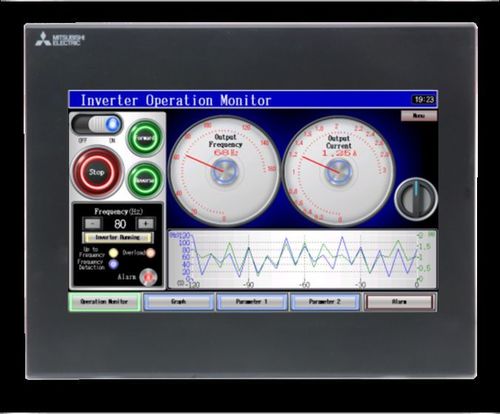

Mitsubishi HMI GS Series Specification
- IP Rating
- IP65 (front panel)
- Screen Size
- 7 inch / 10 inch options
- Processor Type
- 32-bit RISC Processor
- Frequency
- 50/60 Hz
- Phase
- Single Phase
- Weight
- Approx. 1.2 kg
- Cable Length
- As per requirement
- Mounting Type
- Panel Mount
- Application
- Industrial Automation
- Automation Grade
- Automatic
- Control Type
- Touch Screen
- Connectivity Type
- Ethernet, RS232, RS422/485
- Features
- TFT LCD, 65K Colors, Multi-language Support, Compact Design
- Material
- ABS Plastic / Polycarbonate
- Power
- 24V DC (typical)
- Temperature
- 0°C to 55°C (Operating)
- Voltage
- 24V DC
- Operating System
- Proprietary OS
- Resolution
- 800 x 480 pixels (WVGA)
- USB Interface
- 1x USB Host, 1x USB Device
- Touch Panel
- 4-wire analog resistive
- Storage
- 128MB Flash Memory
- Recipe Function
- Supported
- Expansion Slot
- Yes (SD/SDHC card)
- Humidity
- 10% to 90% RH (non-condensing)
- Backlight Life
- Approx. 50,000 hours (at 25°C)
- Serial Port
- 1x RS232, 1x RS422/485
- Backup Battery
- Yes (for RTC & Memory)
- Data Logging
- Supported
- Color Depth
- 65,536 colors
- Display Type
- TFT LCD with LED Backlight
- Alarm Function
- Supported
Mitsubishi HMI GS Series Trade Information
- Minimum Order Quantity
- 1 Piece
- Supply Ability
- 50 Pieces Per Day
- Delivery Time
- 4 Days
Mitsubishi HMI GS Series About
Specification
| Operating System | Windows 10 |
| Brand | Mitsubishi |
| Control Type | Touch Screen |
| Display Size | 7 |
| Mounting Type | Panel Mount |
| Phase | Single phase |
| Resolution | 800 x 480 Pixels |
Technical Details 
High-Resolution Visualization
Enjoy remarkably vivid and crisp images with the GS Series 800 x 480 pixel (WVGA) TFT LCD display. The 65,536-color capacity guarantees detailed graphics, while the LED backlight provides consistent brightness and a lifespan of up to 50,000 hours, even at elevated temperatures. This makes the display ideal for demanding industrial control and monitoring applications.
Intuitive Touch and Control
The 4-wire analog resistive touch panel offers precise operation, supporting both finger and stylus input for quick access to data, alarms, and recipes. Coupled with its proprietary OS and high-speed 32-bit RISC processor, this HMI enables seamless control, fast response times, and intuitive navigation for users in diverse industrial settings.
Flexible Integration and Expandability
With built-in Ethernet, RS232, RS422/485 interfaces, USB host and device ports, and an SD/SDHC card expansion slot, the GS Series integrates smoothly into existing automation architectures. Its support for data logging and alarm management, together with recipe functions, ensures adaptability for varied automation needs and future system expansions.
FAQs of Mitsubishi HMI GS Series:
Q: How do I install the Mitsubishi HMI GS Series into my control panel?
A: The HMI is designed for straightforward panel mounting. Simply prepare a compatible cutout in your control panel and secure the HMI using the provided mounting hardware. The IP65-rated front ensures reliable protection against dust and water after installation.Q: What are the main benefits of using the TFT LCD with LED backlight in industrial environments?
A: The TFT LCD with LED backlight delivers vibrant color accuracy (65,536 colors) and crisp WVGA resolution, ensuring excellent visibility under varied lighting conditions. Its long backlight life of approximately 50,000 hours minimizes maintenance and downtime.Q: When should I use the expansion slot and what types of SD cards are supported?
A: The expansion slot is ideal for tasks requiring additional memory, such as extended data logging or large recipe files. The GS Series supports SD and SDHC cards, allowing flexible and reliable data storage or program updates as needed.Q: Where can the Mitsubishi GS Series HMI be deployed?
A: This HMI is suitable for wide-ranging industrial automation environments, including manufacturing plants, process control systems, and any setting requiring a robust, operator-friendly human-machine interface. Its operating range (0C to 55C) and durable construction make it adaptable to various installations.Q: What connectivity options are available for system integration?
A: The GS Series offers Ethernet, RS232, RS422/485 serial ports, as well as USB host and device ports. These interfaces ensure seamless integration with PLCs, sensors, SCADA systems, and facilitate data exchange, programming, or firmware updates.Q: How does the data logging and alarm functionality improve process management?
A: Integrated data logging allows for real-time recording and analysis of operational data, while the alarm function provides instant notifications of system errors or status changes. Together, these features enhance process visibility, ensure quick response to issues, and support better decision-making.Q: What measures support long-term reliability and backup in the GS Series HMI?
A: The backup battery safeguards both the real-time clock and memory, preventing loss of crucial data during power interruptions. Combined with robust ABS/polycarbonate enclosure and a single-phase 24V DC power supply, these features ensure stable long-term performance.Tell us about your requirement

Price:
Quantity
Select Unit
- 50
- 100
- 200
- 250
- 500
- 1000+
Additional detail
Mobile number
Email

More Products in Mitsubishi HMI Category
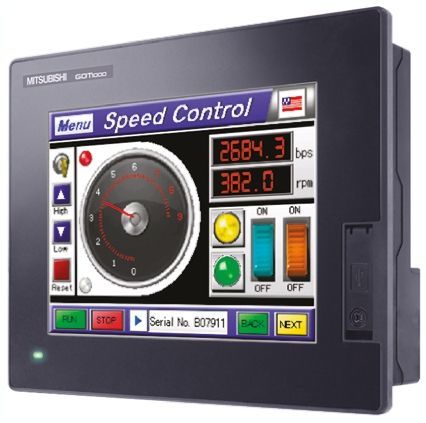
Mitsubishi HMI GOT Series
Price 15,000 INR / Piece
Minimum Order Quantity : 1 Piece
Cable Length : Depends on connectivity, up to 5m for standard cables
Application : Industrial Automation, Process Control, Machine Operation
Automation Grade : Automatic
Mounting Type : Panel Mount

 Send Inquiry

Our Products
- Fatek PLC
- Fatek HMI
- HMI
- Shihlin AC Drive
- Delixi AC Drive VFD
- AC Drive
- PLC
- VFD
- KINCO HMI
- Stepper Drives
- Servo Motor
- Stepper Motor
- AC Servo Drive
- KINCO AC DRIVES
- KINCO VFD
- KINCO SERVO SYSTEM
- KINCO STEPPER SYSTEM
- VFD Controller
- Mitsubishi Ac Drives
- Mitsubishi AC Servo
- Mitsubishi HMI
- Mitsubishi PLC
- Sensorless Vector Control Drives

G-403, S G BUSINESS HUB, GOTA,Ahmedabad - 382481, Gujarat, India

Mr Ravi Kava
(General Manager)
Mobile :07971189506
 Send Inquiry
 Send SMS
Developed and Managed by Infocom Network Private Limited.


