
Call us now :07971189506
 Send Inquiry
Mitsubishi HMI GOT Series
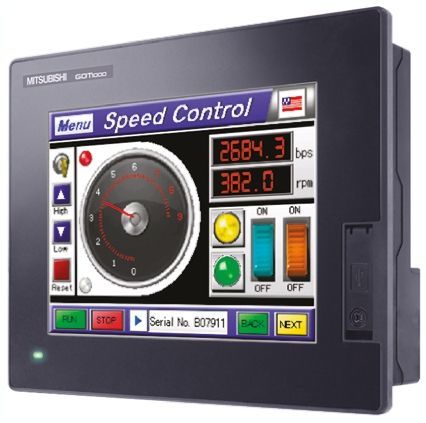

Mitsubishi HMI GOT Series Specification
- Processor Type
- High-performance RISC processor (model dependent)
- Features
- High resolution display, multi-touch support, USB device/host, SD card slot, fast processing, easy PLC connectivity
- IP Rating
- IP65 (Front Panel)
- Mounting Type
- Panel Mount
- Screen Size
- 7-inch, 10.4-inch, 12.1-inch, 15-inch (model dependent)
- Cable Length
- Depends on connectivity, up to 5m for standard cables
- Phase
- Single Phase
- Weight
- Approx. 1.2 kg 2.5 kg (according to model)
- Remote Control
- Yes
- Frequency
- 50/60 Hz
- Application
- Industrial Automation, Process Control, Machine Operation
- Automation Grade
- Automatic
- Control Type
- Touch Screen
- Connectivity Type
- Ethernet, USB, RS232/RS422/RS485
- Material
- ABS Plastic, Polycarbonate
- Power
- 5W - 25W (depending on model)
- Temperature
- 0C to 55C (Operating)
- Voltage
- 24V DC
- Supported Protocols
- Modbus TCP/IP, MCC, Ethernet/IP
- Operating System
- Dedicated Embedded OS
- Cooling Method
- Natural air cooling
- Language Support
- Multilingual GUI
- Data Logging
- Supported
- Storage
- Internal memory 15 MB to 128 MB (model dependent)
- Touch Type
- Analog resistive touch
- Display Resolution
- 800 x 480 (WVGA) to 1024 x 768 (XGA)
- Backlight
- LED, 50,000 hours (typical)
- Alarm Function
- Yes
- Relative Humidity
- 10% to 90% (non-condensing)
- Vibration Resistance
- 5 to 9 Hz (amplitude 3.5 mm), 9 to 150 Hz (acceleration 9.8 m/s)
- Power Consumption
- Maximum 25W (based on model)
- Software Compatibility
- GT Works3, GX Works2, MELSOFT software suite
- Expansion Slots
- SD card slot, USB host/device
- Color Display
- 65,536 colors (True Color display)
Mitsubishi HMI GOT Series Trade Information
- Minimum Order Quantity
- 1 Piece
- Supply Ability
- 50 Pieces Per Day
- Delivery Time
- 4 Days
Mitsubishi HMI GOT Series About
The GOT1000 delivers the competitive advantage.
The GOT1000 series offers six classes of terminals to fit any system or budget requirement.
Specification
| Operating System | Windows 10 |
| Brand | Mitsubishi |
| Configuration Software | GT |
| Control Type | Touch Screen |
| Display Size | 7 inch |
| Mounting Type | Panel Mount |
| Phase | Single Phase |
| Resolution | 800 x 480 Pixels |
Technical Details 
High-Resolution Displays for Every Need
Mitsubishi GOT Series HMIs are built to deliver precise, vibrant images with true color support. Resolutions range from standard WVGA (800 x 480 pixels) to detailed XGA (1024 x 768 pixels), ensuring clear visualization of processes. Available in multiple screen sizes, these HMIs are adaptable for various machine or factory applications, providing excellent readability and user interaction in all conditions.
Robust Industrial Design & Easy Integration
Constructed with a durable ABS plastic and polycarbonate housing, these HMIs feature a front panel rated at IP65, making them resistant to dust and water splashes. Their panel mounting and natural air cooling system ensure simple installation and reliable operation. With a range of connectivity options and protocol support, the GOT Series integrates smoothly into new or existing process control environments.
Advanced Features for Enhanced Automation
The GOT Series is equipped with features essential for modern automation: multi-touch analog resistive screens, internal and expandable storage, alarm functions, and data logging capabilities. Their compatibility with GT Works3, GX Works2, and the MELSOFT suite streamlines programming and maintenance, while multilingual support and remote access capabilities optimize operations in diverse industrial settings.
FAQs of Mitsubishi HMI GOT Series:
Q: How do I expand the storage capacity of a Mitsubishi GOT Series HMI?
A: Storage expansion is straightforward using the built-in SD card slot or USB host. Depending on your application requirements, simply insert a compatible SD card or USB flash drive to store more data files, programs, or logs.Q: What is the process for connecting the HMI to a PLC or other equipment?
A: You can connect the HMI to PLCs or industrial devices using Ethernet, USB, or serial interfaces (RS232/RS422/RS485). The device supports popular protocols like Modbus TCP/IP and Ethernet/IP, ensuring seamless integration with Mitsubishi and third-party control systems.Q: What benefits does the analog resistive touch screen offer in industrial environments?
A: Analog resistive touch screens enable precise input, even when operators are wearing gloves. This is especially beneficial in industrial settings where touch accuracy and durability are essential.Q: When should I use the data logging and alarm functions of the GOT Series HMI?
A: Data logging is ideal for recording process trends, historical values, or tracking machine utilization, while the alarm function helps monitor and alert operators to abnormal events. Both features enhance process oversight and facilitate timely maintenance actions.Q: Where can Mitsubishi GOT Series HMIs be installed and are they suitable for harsh environments?
A: These HMIs are designed for panel mounting in heavy-duty industrial facilities. With an IP65-rated front panel, wide operating temperature range (0C to 55C), and robust material construction, they perform reliably in challenging conditions.Q: How does multilingual GUI support enhance usage in diverse workplaces?
A: Multilingual GUI support allows operators to switch the user interface language, making it easier for multinational teams to operate and maintain machinery efficiently, reducing the risk of operator error.Tell us about your requirement

Price:
Quantity
Select Unit
- 50
- 100
- 200
- 250
- 500
- 1000+
Additional detail
Mobile number
Email

More Products in Mitsubishi HMI Category
Mitsubishi HMI GS Series
Price 15,000 INR / Piece
Minimum Order Quantity : 1 Piece
Connectivity Type : Ethernet, RS232, RS422/485
Temperature : 0C to 55C (Operating)
Automation Grade : Automatic
Control Type : Touch Screen

 Send Inquiry

Our Products
- Fatek PLC
- Fatek HMI
- HMI
- Shihlin AC Drive
- Delixi AC Drive VFD
- AC Drive
- PLC
- VFD
- KINCO HMI
- Stepper Drives
- Servo Motor
- Stepper Motor
- AC Servo Drive
- KINCO AC DRIVES
- KINCO VFD
- KINCO SERVO SYSTEM
- KINCO STEPPER SYSTEM
- VFD Controller
- Mitsubishi Ac Drives
- Mitsubishi AC Servo
- Mitsubishi HMI
- Mitsubishi PLC
- Sensorless Vector Control Drives

G-403, S G BUSINESS HUB, GOTA,Ahmedabad - 382481, Gujarat, India

Mr Ravi Kava
(General Manager)
Mobile :07971189506
 Send Inquiry
 Send SMS
Developed and Managed by Infocom Network Private Limited.


